 Setup
SetupThe commands in this section are remote commands only and have no front-panel key / GUI equivalent.
The signal generator instrument provides the remote operation error queue as defined in IEEE SCPI standard version 1999.
There is a separate SCPI Error queue for each I/O session. Boot-up instrument messages are handled differently. These messages are placed into the error queue of the first I/O session.
Remote command only.
Queries the SCPI Error queue for all unread items and removes them from the queue. The response is a comma separated list of number, string pairs in FIFO order. If the queue is empty, the response is 0,"".
|
SCPI Command |
:SYSTem:ERRor:ALL? |
|
SCPI Example |
SYST:ERR:ALL? |
| Notes | When the SCPI Error queue is empty, 0,"" is returned. |
| Preset | N/A |
|
State Saved |
No |
|
Initial S/W Revision |
A.01.00 |
Remote command only.
Queries the SCPI Error queue for the number of unread items. As errors and events may occur at any time, more items may be present in the queue at the time it is actually read.
|
SCPI Command |
:SYSTem:ERRor:COUNt? |
|
SCPI Example |
SYST:ERR:COUN? |
| Notes | If the queue is empty, 0 is returned. |
| Preset | N/A |
|
State Saved |
No |
|
Initial S/W Revision |
A.01.00 |
Remote command only.
Queries the SCPI Error queue for the next item and removes it from the queue. The response returns the full queue item consisting of an integer and a string. When the queue is empty, 0,"No error" is returned.
|
SCPI Command |
:SYSTem:ERRor[:NEXT]? |
|
SCPI Example |
SYST:ERR? |
| Notes | If the queue is empty, 0,"No error" is returned. |
|
State Saved |
No |
|
Initial S/W Revision |
A.01.00 |
Remote command only.
Queries the SCPI Error queue for the next item and removes this item from the queue. The response returns only the error code number omitting the string. When the queue is empty, 0 is returned.
|
SCPI Command |
:SYSTem:ERRor:CODe[:NEXT]? |
|
SCPI Example |
SYST:ERR:COD? |
| Notes | If the queue is empty, 0 is returned. |
| Preset | N/A |
|
State Saved |
No |
|
Initial S/W Revision |
A.01.00 |
Remote command only.
Query Only.
Returns all entries in the error queue and then clears the queue. The response returns only the error code numbers, omitting the string.
|
SCPI Command |
:SYSTem:ERRor:CODE:ALL? |
|
SCPI Example |
:SYST:ERR:CODE:ALL? |
|
Notes |
When the queue is empty, returns 0. |
|
State Saved |
No |
|
Initial S/W Revision |
A.20.00 |
Remote command only
Clears the GUI and SCPI error queue. There is no query form for the command.
| SCPI Command |
:SYSTem:ERRor:HISTory:CLEar |
|
SCPI Example |
SYST:ERR:HIST:CLE |
|
State Saved |
No |
|
Initial S/W Revision |
A.20.00 |
Remote command only.
Queries the Message queue and returns the first message which has not been queried/read from this queue. Subsequent query returns the next unread message from the queue, and so on.
|
SCPI Command |
:SYSTem:NOTification? |
|
SCPI Example |
:SYST:NOT? |
| Notes |
The response is a comma separated value that consists of:
When all messages have been read from the queue, further queries return:
"",NONE,""
Messages related only to the User Interface, such as "Local Operation Resumed", are not returned by this command. This command only queries and returns the message from the Message queue but does not alter the contents of the Message queue. |
|
Initial S/W Revision |
A.16.20 |
Remote command only.
This query returns a comma-separated list of installed software application options. This differs from the output for *OPT? in that the *OPT? lists the installed hardware options.
|
SCPI Command |
:DIAGnostic[:CPU]:INFormation:OPTions? |
|
SCPI Example |
:DIAG:INF:OPT? |
|
State Saved |
No |
|
Initial S/W Revision |
A.01.00 |
Remote command only.
Disables the instrument keyboard to prevent local input when the instrument is controlled remotely. Annunciation showing a "K" for "Klock" (keyboard lock) alerts the local user that the keyboard is locked. Klock is similar to the GPIB Local Lockout function; namely that no front-panel keys are active with the exception of the Power Standby key. (The instrument is allowed to be turned-off if Klock is ON.) The Klock command is used in remote control situations where Local Lockout cannot be used.
Although primary intent of Klock is to lock-out the front panel, it will lock-out externally connected keyboards through USB. Klock has no effect on externally connected pointing devices (mice).
The front panel ‘Local’ key (Cancel/Esc) has no effect if Klock is ON.
|
SCPI Command |
:SYSTem:KLOCk OFF|ON|0|1 :SYSTem:KLOCk? |
|
SCPI Example |
:SYST:KLOC ON |
|
Notes |
Keyboard lock remains in effect until turned-off or the instrument is power-cycled |
|
Preset |
Initialized to OFF at startup, unaffected by Preset |
|
State Saved |
No |
|
Initial S/W Revision |
A.01.00 |
Remote command only.
Enables or disables active updates for the instrument’s display when the instrument is remotely controlled. When On, the performance (speed) of the remote operation may be degraded. If the instrument is not in LOCAL LOCKOUT, pressing the ESC/Local key on the instrument’s front panel will set the display to On and resume display updates.
|
SCPI Command |
:DISPlay:REMote ON|OFF|1|0 :DISPlay:REMote? |
|
SCPI Example |
DISP:REM OFF DISP:REM? |
|
Notes |
Pressing the front panel Local key sets the state to On. |
|
Preset |
Not affected by Preset, not part of Persistent State. Always ON immediately after the instrument is booted. |
|
State Saved |
No |
|
Initial S/W Revision |
A.13.00 |
Remote command only.
Turns the display state of the screen On or Off. If the instrument is not in LOCAL LOCKOUT, pressing the ESC or Local key on the instrument’s front panel will set the display to On.
|
SCPI Command |
:DISPlay[:WINDow][:STATe] :DISPlay[:WINDow][:STATe]? |
|
SCPI Example |
DISP OFF DISP? |
|
Couplings |
When Display State is turned OFF/ON, Display Refresh State will also be set to OFF/ON. |
|
Preset |
ON |
|
State Saved |
No |
|
Initial S/W Revision |
A.18.01 |
Remote command only
Sets whether the Power and Frequency (CW) values are displayed on the Home screen or hidden.
ON - Power and Frequency (CW) values are displayed.
OFF - Power and Frequency (CW) values are hidden and replaced with asterisks.
|
SCPI Command |
:DISPlay:ANNotation ON|OFF|1|0 :DISPlay:ANNotation? |
|
SCPI Example |
DISP:ANN OFF DISP:ANN? |
|
Preset |
ON |
|
State Saved |
Y |
|
Initial S/W Revision |
A.20.00 |
Remote command only.
Performs the same functionality as the Win+L function or the "Lock" function on the CTL-ALT-DEL screen in Windows.
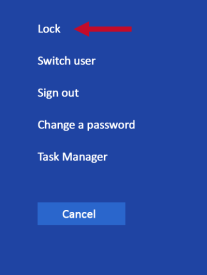
When this command is executed, the computer is immediately locked. The initial login screen appears; no one can access the computer at this point unless they have an account and know the account’s password.
|
SCPI Command |
:SYSTem:LWSTation |
|
SCPI Example |
:SYST:LWST |
|
Notes |
The lock remains in effect until someone logs in |
|
State Saved |
No |
|
Initial S/W Revision |
A.01.00 |
Remote command only.
Outputs a list of the valid SCPI commands for the currently selected Mode.
|
SCPI Command |
:SYSTem:HELP:HEADers? |
|
SCPI Example |
:SYST:HELP:HEAD? |
|
Notes |
The output is an IEEE Block format with each command separated with the New-Line character (hex 0x0A) |
|
Initial S/W Revision |
A.01.00 |
Remote command only.
Determines the instrument application start time.
|
SCPI Command |
:SYSTem:METRics:STIMe? |
|
SCPI Example |
:SYST:METR:STIM? |
|
Notes |
The return value is a string with the format "YYYY-MM-DD<space>HH:MM:SS", in instrument local time. |
|
Initial S/W Revision |
A.01.00 |
Remote command only.
Returns the SCPI version number with which the instrument complies. The SCPI industry standard changes regularly. This command indicates the version used when the instrument SCPI commands were defined.
|
SCPI Command |
:SYSTem:VERSion? |
|
SCPI Example |
:SYST:VERS? |
|
Initial S/W Revision |
A.01.00 |
Remote command only.
Query only
Returns the cumulative number of times that the attenuator bypass has been switched. The subopcode indicates the channel being queried.
|
SCPI Command |
:DIAGnostic[:CPU]:INFormation:CCOunt:ATTenuator[1]|2:BYPass? |
|
SCPI Example |
:DIAG:INF:CCO:ATT:BYP? |
|
Initial S/W Revision |
A.01.00 |
Remote command only.
Query only.
Returns the CPU’s BIOS version in the format provided by the CPU manufacturer.
|
SCPI Command |
:DIAGnostic[:CPU]:BIOS:VERSion? |
|
SCPI Example |
:DIAG:BIOS:VERS? |
|
Notes |
Return value is a string of the BIOS version in the format provided by the controller’s manufacturer. |
|
Initial S/W Revision |
A.09.00 |